Basic Drone Design
The Basic Drone Design module, shown as Drone Basic Design in the app, helps users determine a suitable drone configuration based on simple user inputs. Through this process, users can evaluate the expected performance of the design and estimate its overall cost. No sign-in is needed, and inputs autosave in your browser. The workflow consists of the following five steps:
1. Mission
2. Sizing
3. Performance
4. Components
5. Report
Note: Basic Drone Design is currently under active development. Certain calculation features may be incomplete or subject to modification based on user feedback and continued validation efforts.
1. Mission
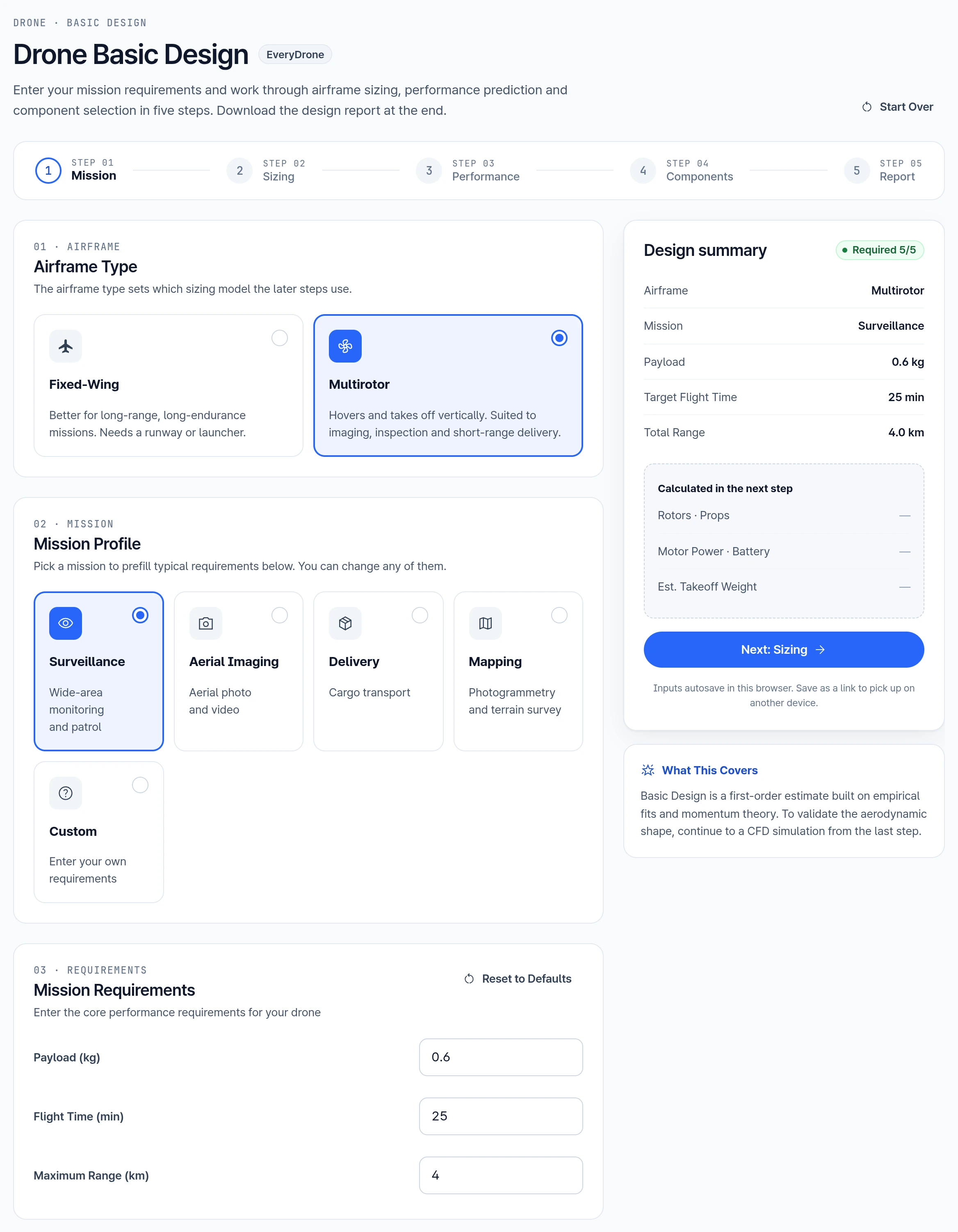
1.1. Airframe Type
Select Fixed-Wing or Multirotor. The airframe type sets which sizing model the later steps use.
1.2. Mission Profile
Specify the intended application of the drone design. The available categories are classified into four primary mission types:
- Surveillance
- Aerial Imaging
- Delivery
- Mapping
For use cases that do not fall within the listed categories, select Custom to proceed with a custom design based on user-defined requirements.
Mission Requirements
Define the core performance requirements for the drone as follows:
- Payload (kg): The weight the drone is required to carry during operation, from 0.1 to 20 kg.
- Target Flight Time (min): The expected duration of continuous flight per battery cycle, from 1 to 600 min.
- Total Range (km): The mission distance the drone must cover, from 0.1 to 1000 km.
These fields prefill from your airframe type and mission profile, and you can change any of them. Reset to Defaults restores the prefilled values. A value outside its range blocks the next step.
Once the values are set, select Next: Sizing to proceed.
2. Sizing
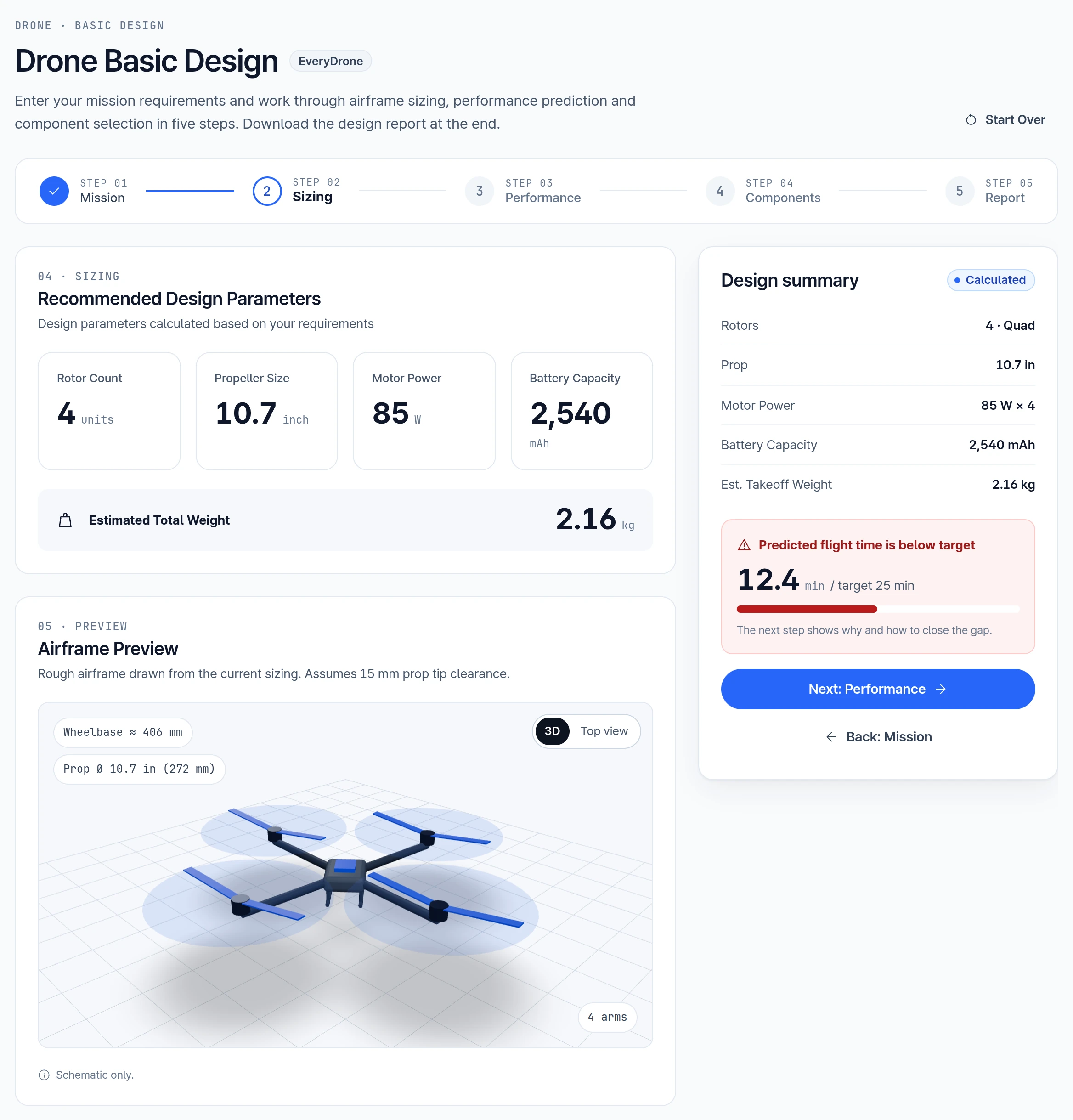
Recommended Design Parameters
Based on the previously entered values for Payload, Target Flight Time, and Total Range, the solution automatically recommends design parameters.
The recommended design parameters include the following specifications:
- Rotor Count (Multirotor) or Wingspan (Fixed-Wing)
- Propeller Size
- Motor Power
- Battery Capacity
- Estimated Total Weight
If the generated information appears to be correct, proceed to the next stage by selecting Next: Performance. If any values were entered incorrectly or require adjustment, select Back: Mission to modify the input parameters accordingly.
Airframe Preview
A schematic of the estimated airframe is provided for visual verification and preliminary assessment, with 3D and Top view options.
3. Performance
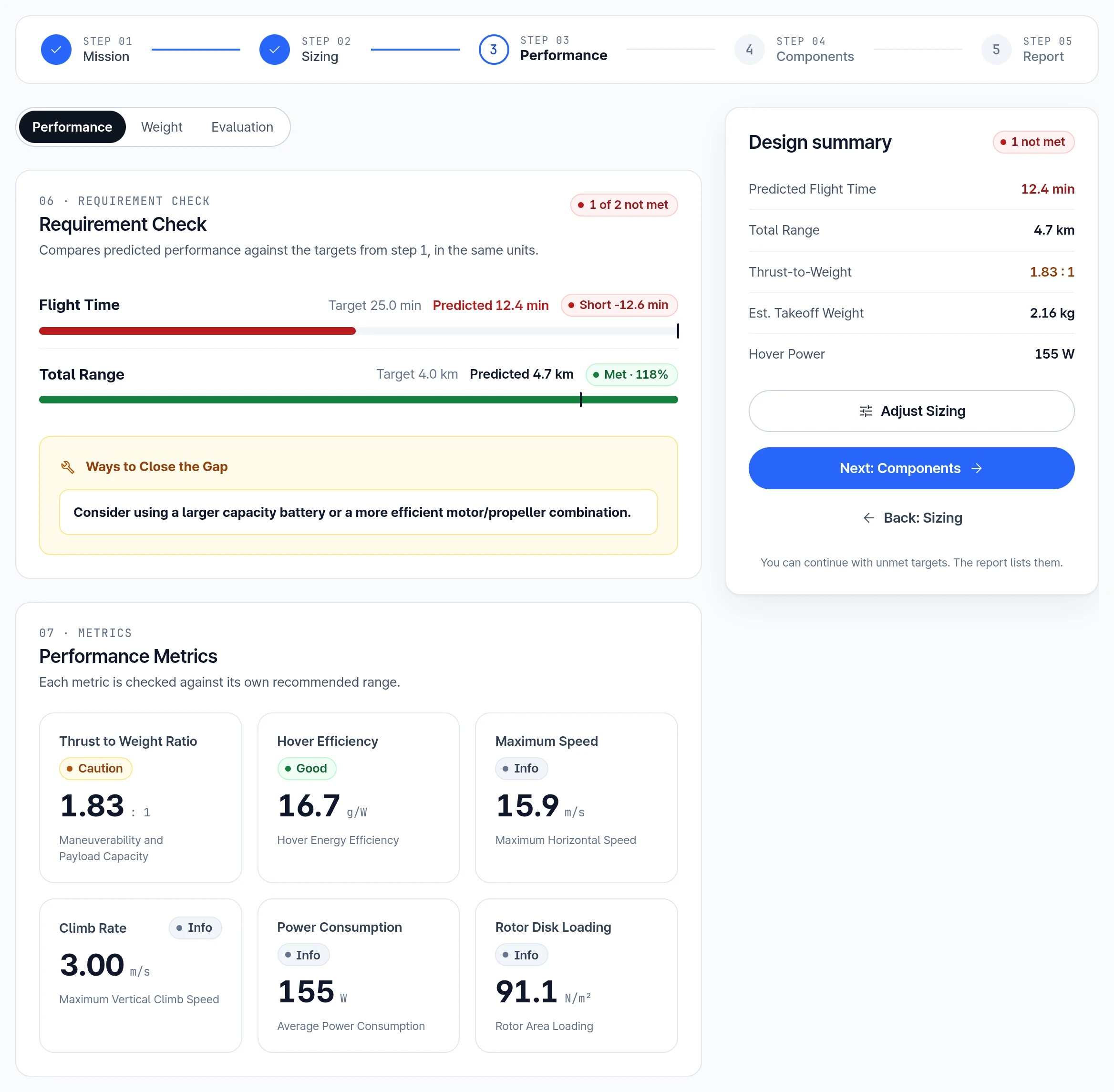
Based on the configured input data, the expected drone performance is estimated. Multirotor designs present six key performance metrics and fixed-wing designs present eight, along with analysis views for Performance, Weight, and Evaluation. The metrics are as follows:
Multirotor
- Thrust to Weight Ratio
- Hover Efficiency
- Maximum Speed
- Climb Rate
- Power Consumption
- Rotor Disk Loading
Fixed-Wing
- Lift to Drag Ratio
- Thrust to Weight Ratio
- Glide Ratio
- Stall Speed
- Cruise Speed
- Maximum Speed
- Climb Rate
- Power Consumption
Performance
The Performance view displays the performance metrics, each checked against its own recommended range, along with the differences between the set values and estimated values for flight time and total range. You can continue to the next step even when a target is not met.
Weight
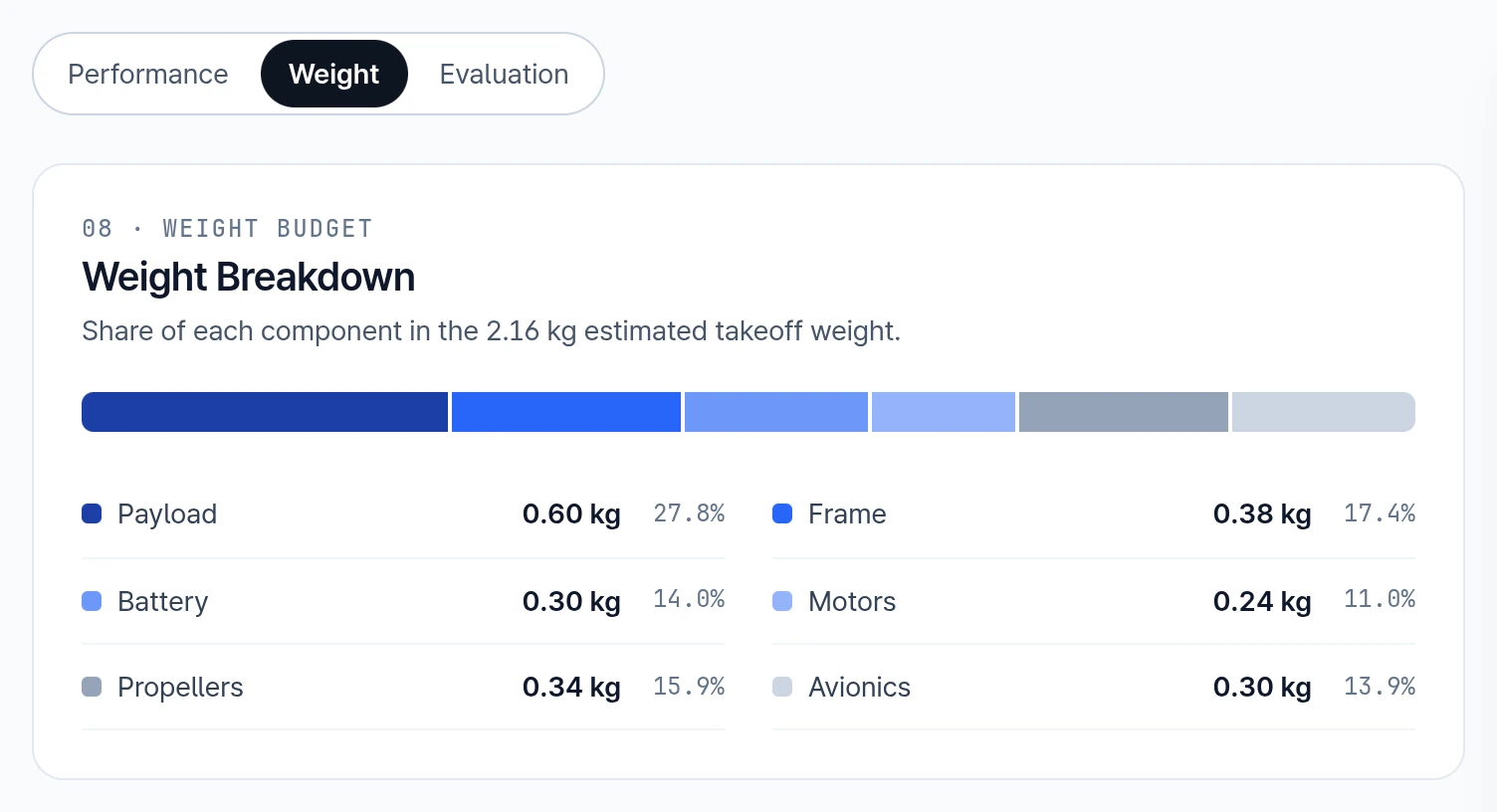
The Weight graph illustrates the estimated weight distribution of the drone components. The components are broadly categorized into Payload, Frame (Airframe on fixed-wing), Battery, Motors, Propellers, and Avionics.
Evaluation
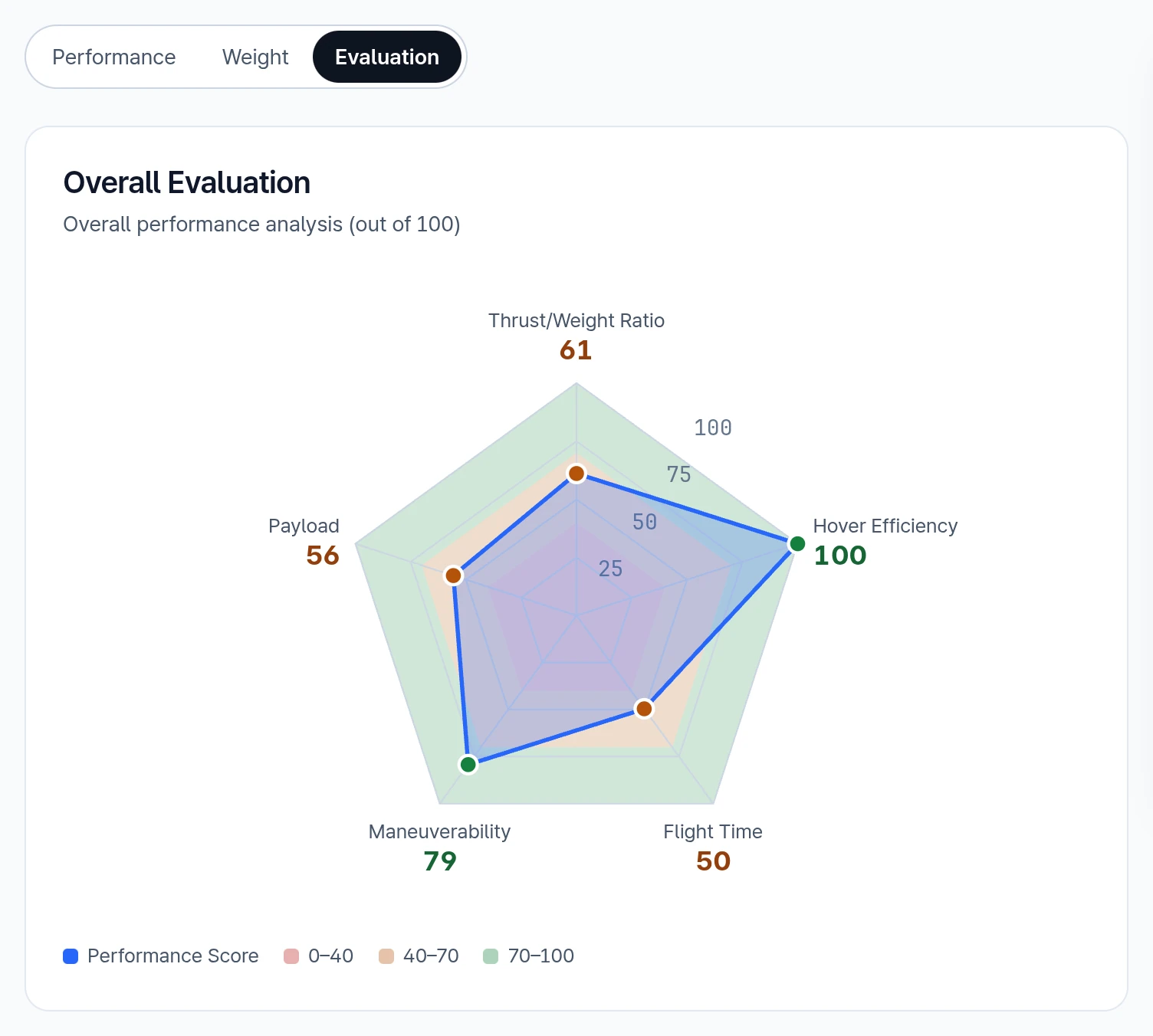
The Evaluation graph presents the overall drone performance assessed against a 100-point scale based on five criteria. These criteria are as follows:
- Multirotor: Thrust/Weight Ratio, Hover Efficiency, Flight Time, Maneuverability, Payload
- Fixed-Wing: Lift/Drag Ratio, Cruise Speed, Flight Time, Flight Range, Payload
After reviewing the drone performance results, proceed to the next step by selecting Next: Components.
4. Components
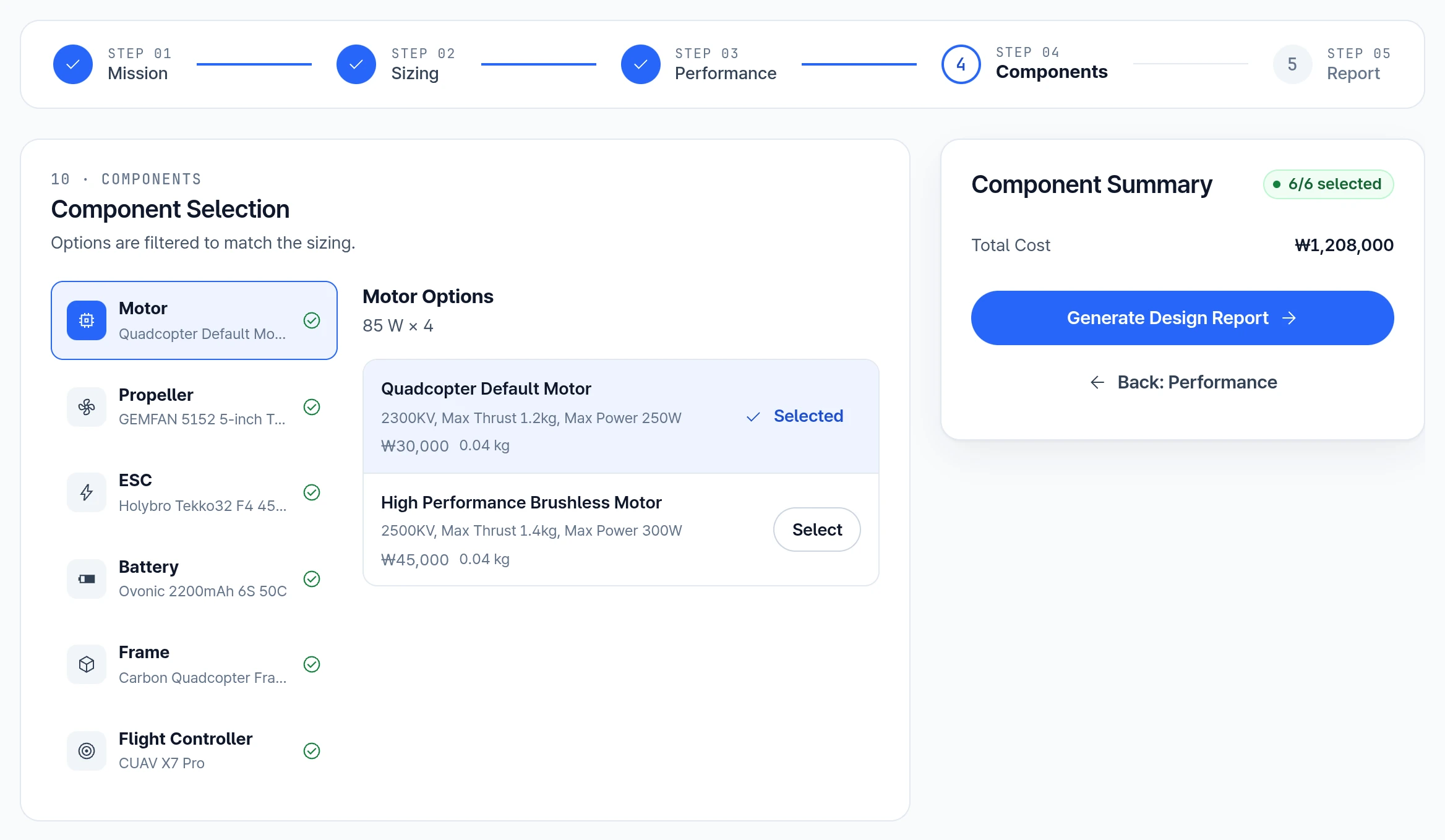
This step involves choosing a product for the Motor, Propeller, ESC, Battery, Frame, and Flight Controller. Each slot lists up to two options filtered to your sizing and airframe, with model, specifications, price and weight, and a Select button. If nothing in the catalog matches a slot, the slot says so and offers Edit Design.
The options come from a limited catalog and may not match the sizing exactly. For example, propeller options can differ from the recommended Propeller Size, and a generic default motor can appear. Compare each option's specifications with your sizing values before selecting it.
Once all six components have been selected, proceed to the next step by selecting Generate Design Report.
5. Report
The report is a single page, with a Report Contents list for moving between these parts:
- Technical Specifications
- Final Performance Summary
- Risk Factor Analysis
- Safety Features
- Cost Analysis
- Recommendations & Improvements
Performance figures come from the sizing and performance steps. The selected components set the cost breakdown and component names, so swapping a part does not change flight time, range, or total weight.
Technical Specifications
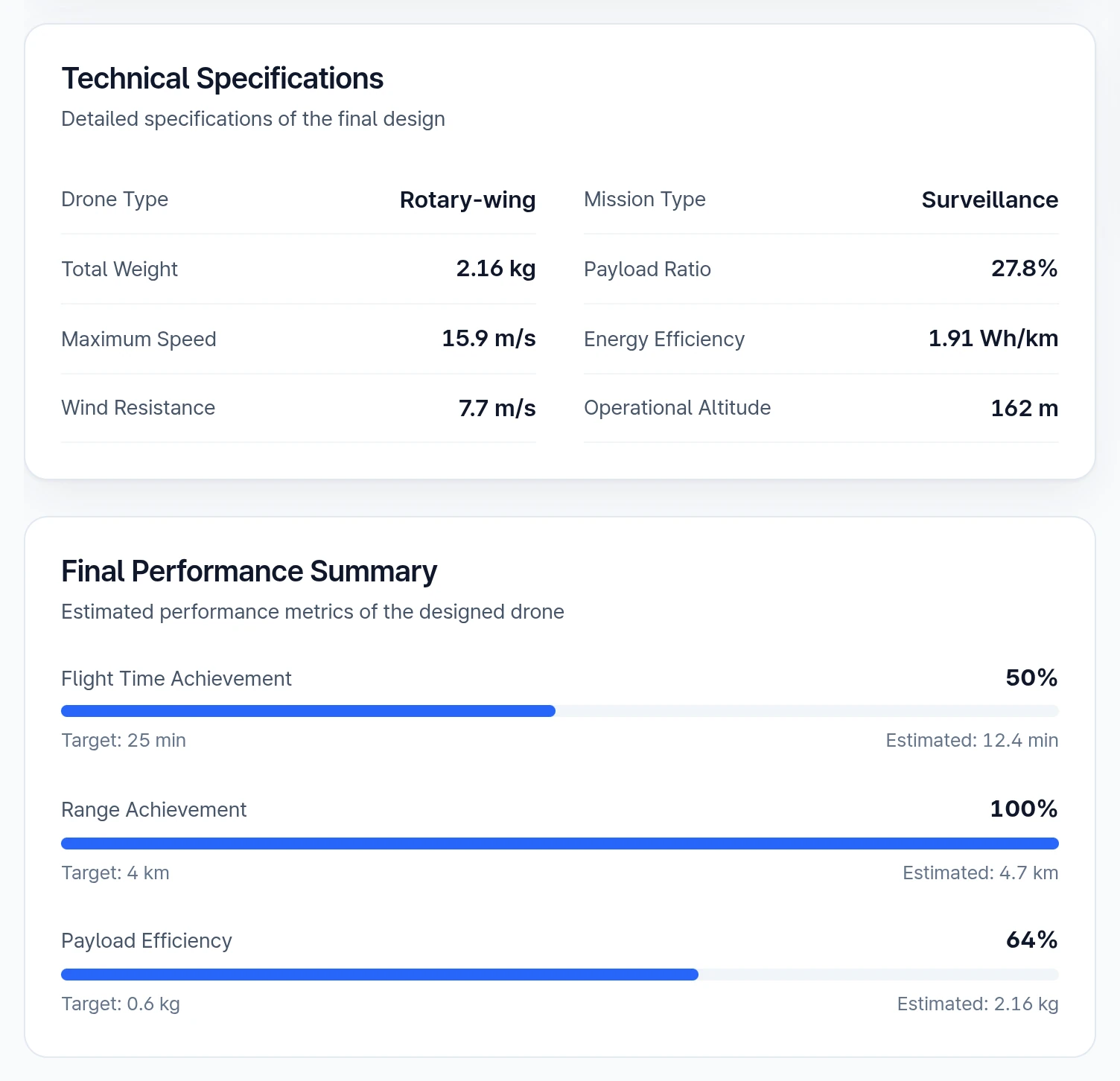
This section displays the specifications of the final design. It uses some older names than the earlier steps: Rotary-wing for Multirotor, Photography for Aerial Imaging, and Other for Custom.
Final Performance Summary
This section compares your targets with the estimated values through Flight Time Achievement and Range Achievement.
Payload Efficiency is read differently. Its Target is the payload and its Estimated value is the total weight, so these are two different quantities rather than a target and a result. The percentage is payload ÷ total weight × 50 + 50.
Risk Factor Analysis
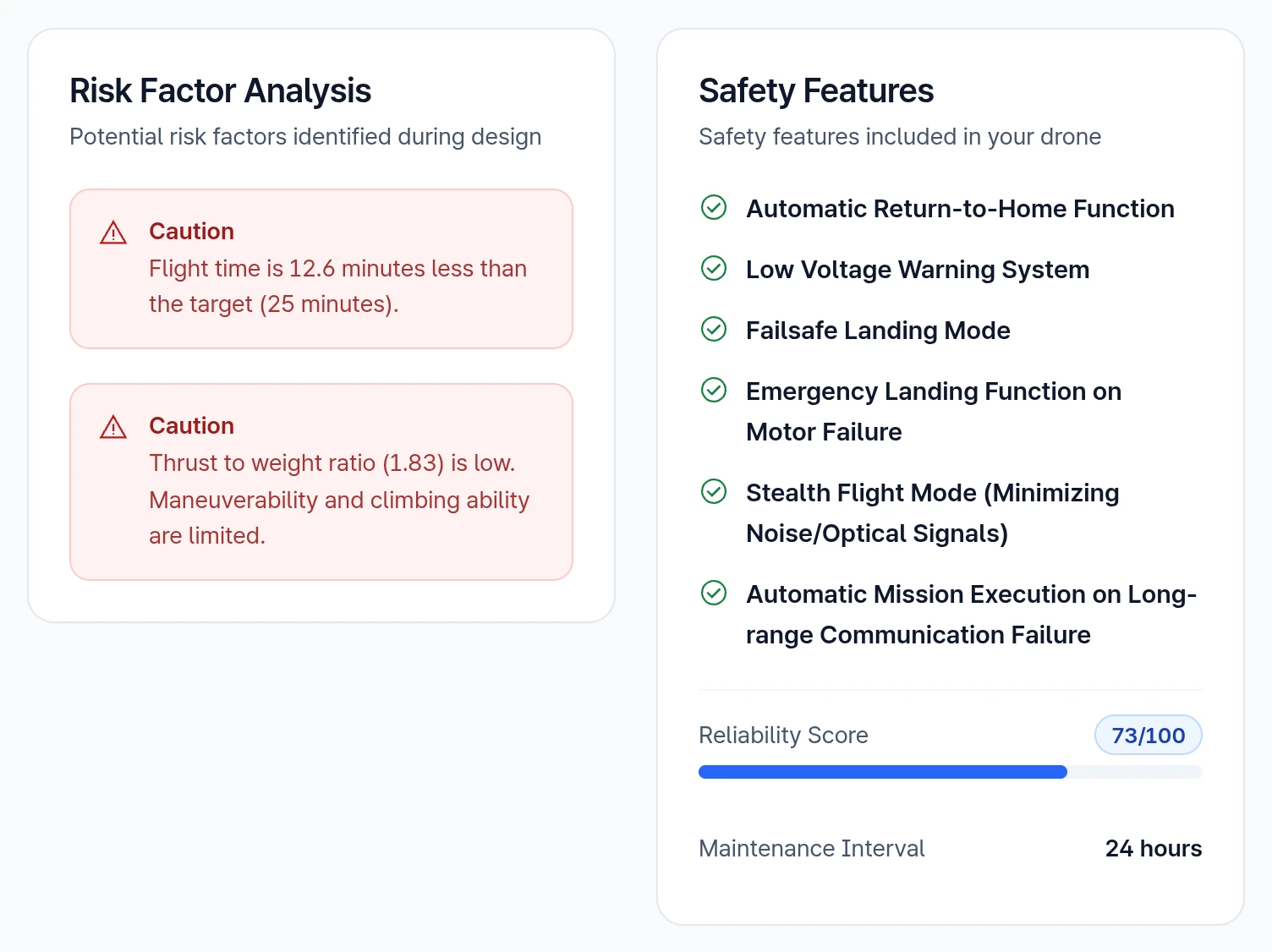
The Risk Factor Analysis identifies potential hazards associated with the actual manufacturing and operation of the drone. The risk factors provided are as follows:
- Common: Flight Time, Flight Range, Payload Ratio
- Fixed-Wing: Lift-to-Drag Ratio, Stall Speed, Climb Rate
- Multirotor: Low Thrust, High Thrust, Hover Efficiency, Payload Ratio Relative to Number of Rotors
Safety Features
This section identifies the safety factors of the drone and provides a Reliability Score out of 100 and the Maintenance Interval.
Cost Analysis
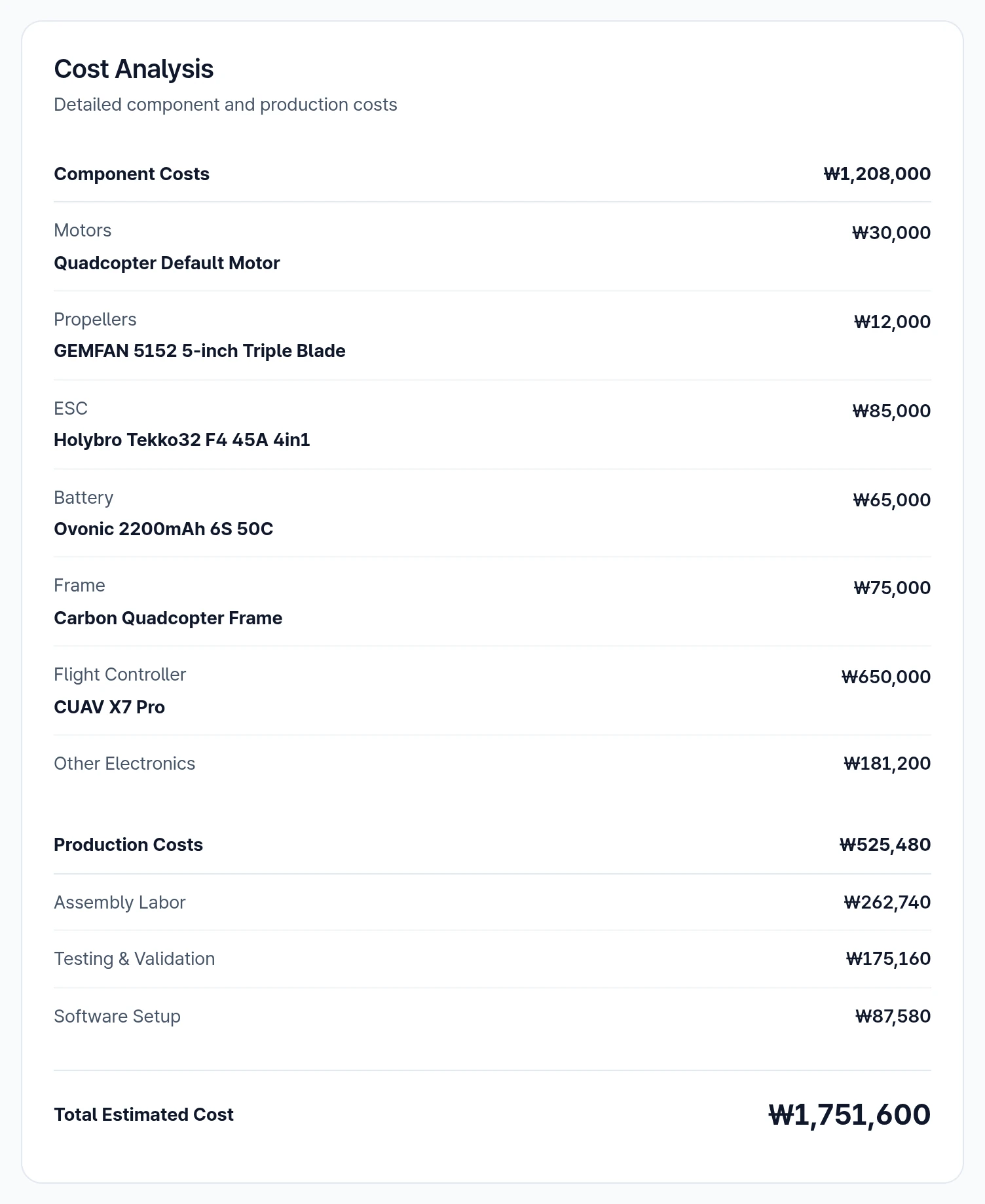
This section lists component costs, production costs (assembly labor, testing and validation, software setup) and the total estimated cost, in Korean won (₩).
Recommendations & Improvements
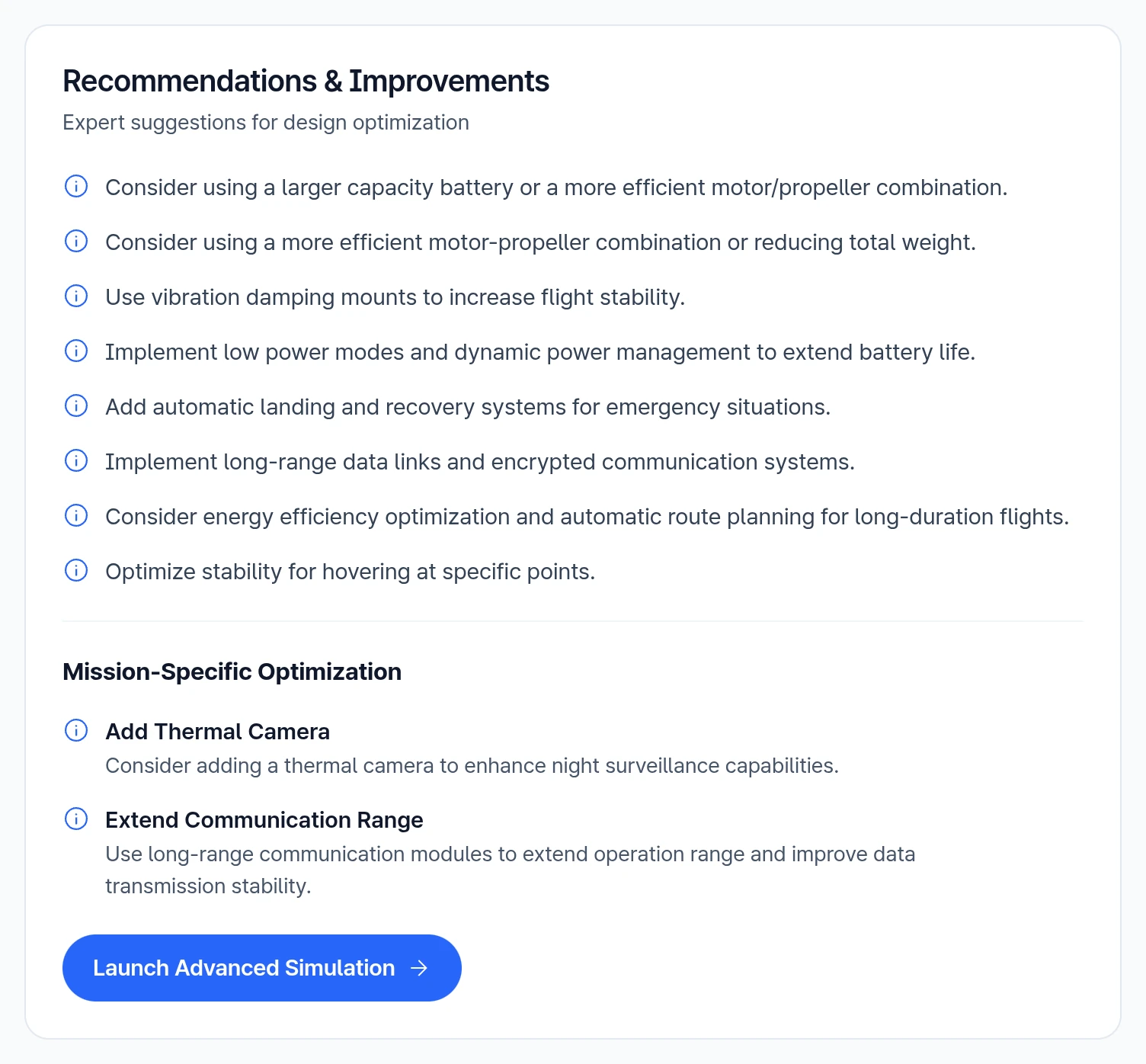
This section provides comments on additional factors to consider for performance enhancement. The comments are organized based on the following categories:
- Common: Flight Time, Flight Range
- Fixed-Wing: Lift-to-Drag Ratio, Stall Speed, Climb Rate, Cruise Control, Gust Response, Landing Gear
- Multirotor: Thrust-to-Weight Ratio, Throttle Limits, Propeller Efficiency, Motor Performance, Vibration Damping, Power Management, Emergency Systems
- Mission-Specific Optimization: Aerial Imaging, Delivery, Surveillance, Mapping, Custom
Export and Other Actions
- Download PDF or PDF Report: Opens the browser print dialog, where you can save the report as a PDF.
- CSV Data: Downloads the raw sizing and performance data.
- Edit Design: Returns to the Mission step.
- Launch Advanced Simulation: Opens new-project setup when you are signed in, and the sign-up flow otherwise. It does not pass design data to the new project.
- Sample Report: Opens a sample aerial-imaging quadcopter report. You can change its values without affecting your own design, or select Use This Sample to copy it into your design.
- Start Over: Clears the current design.
6. Feedback
The estimates may deviate from actual results under real-world manufacturing and flight conditions, so treat them as an early-stage guide. Launch Advanced Simulation opens new-project setup but does not pass design data to it.
Send suggestions for Basic Drone Design or new parameters to support@everysim.io.
Need Assistance or Have Questions?
Frequently Asked Questions: FAQ Link
Support Inquiries: support@everysim.io